How to Navigate and Use the Grass Dashboard
A simple guide to understanding your Grass dashboard and making the most of your contribution.
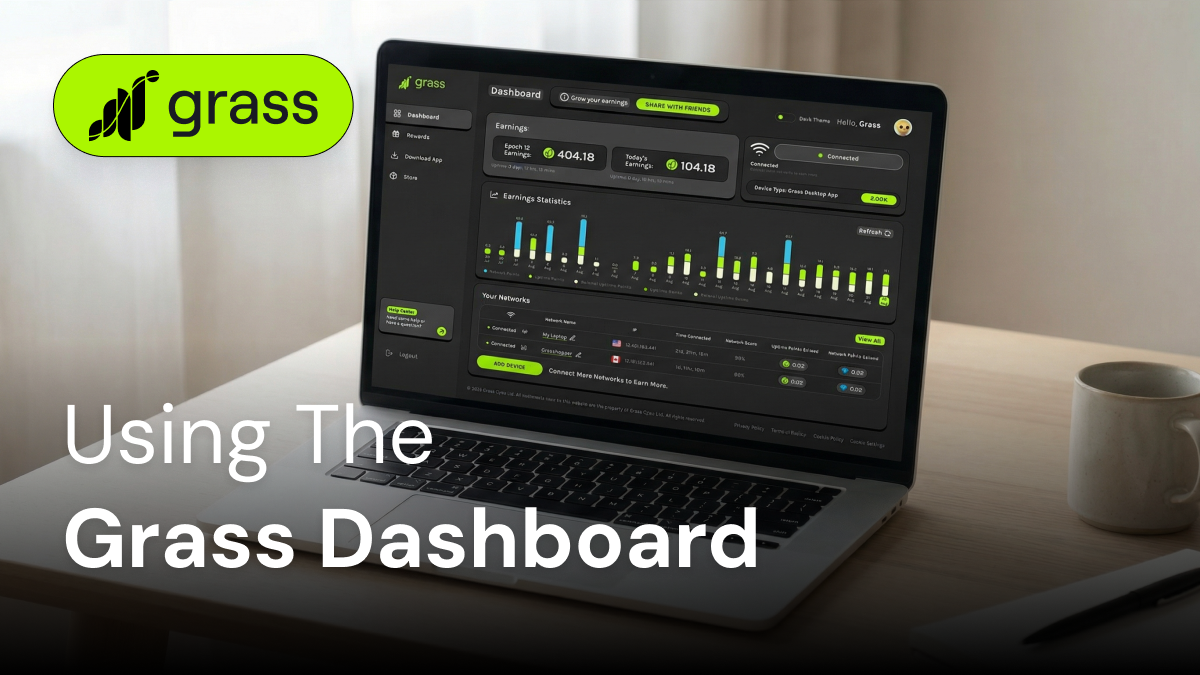
New to Grass? You might be wondering where to start and how to track your progress (i.e., your Grass Points). The answer is: The Grass dashboard.
Think of the Grass dashboard as your command center for all things Grass. This is the place where you can monitor your Grass Points, manage your account settings, and get important insights into how you’re contributing to the Grass network.
Whether you’re using the Grass app on your phone or the Grass desktop app, the dashboard is your go-to hub for your Grass journey.
Key Metrics on the Main Dashboard
Before diving into the key metrics of your Grass dashboard, it’s helpful to remember what Grass is all about and what’s behind all those metrics in the first place.
In a nutshell, Grass is an app that rewards users like you for sharing your unused internet (also called bandwidth). By running the Grass app on your phone or desktop (or both), you contribute to the Grass network and earn Grass Points in the process.
Grass Points are divided into three categories:
- Uptime Points: You’ll earn these Points based on the amount of time your phone or computer is connected to the Grass network, making your internet (bandwidth) available for use.
- Network Points: Earn Network Points when Grass actually puts your extra internet to work to power web data requests. Network Points are distributed every day from a fixed pool of 1,000,000 Points.
- Referral Points: Refer your friends and family members to Grass. When they sign on and start sharing their unused internet to the network, you’ll earn Points bonuses based on their activity (without taking any Grass Points away from them).
Whichever way you earn Grass Points, they all pave the way toward receiving Grass Tokens, which possess real-world value. Rest assured, Grass privacy measures make it so that the app can never see your internet activity or browser history.
With this background in mind, let’s explore the Grass dashboard in greater detail.
Earnings
Partnering with Grass is all about earning Grass Points, so at the top of the dashboard, you’ll see your total Points earnings for both the current Epoch and for the day. (Epochs simply represent the amount of Grass Points you can earn over a defined period of time.)
Connection Status
You can’t earn Grass Points if you aren’t connected to the network. The next section of your dashboard will tell you whether you’re currently connected and sharing your unused internet with Grass. This is also the area where you can choose to manually disconnect or reconnect to the network.
Your Networks
One valuable way to speed up your Grass Points earnings is to connect your devices to multiple networks. The “Your Networks” section of the dashboard lists all the networks you’ve used in the past and shows your current connection status to each network.
This section also identifies each network by its IP address, tracks time connected, provides an overall network score, and breaks out the Grass Points you’ve earned from each network.
Earnings Statistics
Currently only viewable on the Grass desktop app, the Earnings Statistics metric breaks down your Points earnings by day. This chart gives you a quick and comprehensive view of how your networks have been performing over the past couple of weeks.
This chart also allows you to dive deeper into the Grass Points system by breaking down your Points earnings into Uptime, Network, and Referral Points. (Each Points category is color-coded for easier distinction.)
Referral Code
At the very top of your dashboard, you’ll see a small section that says “Grow Your Earnings.” One of the fastest and easiest ways to earn more Grass Points is to refer your friends, family members, and acquaintances to the Grass network. When they sign up and start sharing their extra internet, you’ll earn Grass Points based on their activity.
Click the green “Share With Friends” button, and you’ll be able to share your personal referral code through all the major social networks or directly by copying your referral link.
The Rewards Dashboard
The main Grass dashboard is designed to give you a comprehensive overview of how you are (and have been) interacting with the Grass network. However, if you want to take a deep dive into the Grass Points system, click on the Rewards tab (it’s the little gift box icon).
This will take you into the world of Grass Points, which includes metrics such as:
- Current Tier: As you earn Grass Points, work your way through 10 tiers, from Iron to Titan, picking up Points bonuses along the way.
- Uptime Milestone Tracker and Rewards Roadmap: See how far along you are to completing your current earnings tier.
- How You’re Earning: Get a clearer breakdown of where your Grass Points are coming from, including Uptime Points vs. Referral Points.
- Capturing The Web: Provides a quick and easy breakdown of how much you’ve earned through the previous few Epochs.
Just note that your rewards dashboard will look slightly different depending on whether you’re using your Grass desktop or Grass mobile app.
Tips for Getting the Most Out of the Dashboard
The Grass dashboard is the best way to get all the information you need on your journey with Grass, but don’t stop there. Use that information to maximize your Grass Points earnings and make the most out of your Grass experience.
- Check your connection regularly: Make a habit of opening your Grass dashboard often to make sure your devices are connected to the network and you’re actively earning Grass Points.
- Review your active networks: Keep an eye on your network list to learn which networks are bringing in the most Points.
- Name your networks: Grass lets you give unique names to each network, so you can easily distinguish them.
- Know your tier status: Don’t forget to regularly review your rewards dashboard so you can follow your rewards path and keep moving toward the next rewards tier.
- Track your Points breakdown: Where are the majority of your Points coming from? Is it uptime, network usage, or referrals? This knowledge can help you be more strategic in your overall Points strategy.
- Participate in the Grass referral system: Don’t just ignore your personal referral code. If you have friends or family members who are crypto curious, send them your referral code from your Grass dashboard, and then watch your referral Points soar.
- Disconnect when necessary: While the Grass app will automatically throttle itself when you’re using a lot of internet or when your mobile battery is low, there might be times when you would prefer to disconnect manually. This could be when you’re reaching the limit of your mobile data plan or when you’re connecting to a network (such as at work or school) where you don’t have permission to run the Grass app.
Unlock the Power of the Grass Dashboard
The Grass dashboard puts you in control of your Grass experience. It’s packed with features designed to help you track your Points progress, manage your devices and networks, and grow your earnings.
While the dashboard may seem a little confusing at first, by using it regularly, you’ll soon become a dashboard navigation pro. Plus, as the Grass platform continues to evolve, you can expect even more great new features and improvements in the future.
What are you waiting for? Download Grass today and start exploring your personal dashboard.